Indexing Elastic docs, blogs, etc. into Elasticsearch is simple with the Elastic web crawler,
Elastic Crawler. This guide will walk you through the steps to configure the
Elastic web crawler to push content from Elastic’s documentation site into your Elasticsearch instance. Note this
can be done for other sites as well.
Prerequisites
- Get your connection details, see guide
- Generate an API Key using the developer tools
POST /_security/api_key
{
  "name": "pmccann-cursor-mcp-read-only",
  "expiration": "90d",
  "role_descriptors": {
 "mcp-access": {
   "cluster": [
     "monitor_inference"
   ],
   "indices": [
     {
       "names": [
         "*"
       ],
       "privileges": [
         "read",
         "view_index_metadata"
       ]
     }
   ],
   "applications": [
     {
       "application": "kibana-.kibana",
       "privileges": [
         "feature_agentBuilder.read"
       ],
       "resources": [
         "space:default"
       ]
     }
   ]
 },
 "read-only-role": {
   "indices": [
     {
       "names": [
         "*"
       ],
       "privileges": [
         "read"
       ],
       "allow_restricted_indices": false
     }
   ]
 }
  }
}
- Docker installed on your local machine
Elastic Crawler Configuration File
You can drive your web crawling using a configuration file. Below is an example configuration file that you can use to
crawl the Elastic documentation site and index the content into Elasticsearch.
cat > crawl-config-elastic-docs.yml << EOF
output_sink: elasticsearch
output_index: web-crawl-elastic-docs

elasticsearch:
  host: https://<YOUR ENDPOINT>
  port: 443
  api_key: <YOUR API KEY>
  pipeline_enabled: false

domains:
  - url: https://www.elastic.co
    seed_urls:
        - https://www.elastic.co/docs
    extraction_rulesets:
      - url_filters: []
        rules:
          - action: "extract"
            field_name: "content"
            selector: "#markdown-content"
            join_as: "string"
            source: "html"
    crawl_rules:
      - policy: allow
        type: begins
        pattern: /docs
      - policy: deny
        type: regex
        pattern: .*
EOF
Run the Crawler
docker run \
  -v "$(pwd)":/config \
  -it docker.elastic.co/integrations/crawler:latest jruby \
  bin/crawler crawl /config/crawl-config-elastic-docs.yml
Create a Data View in Kibana
Create a data view in Kibana to visualize and explore the indexed data.
Name: web-crawl-*
Index Pattern: web-crawl-*
Timestamp field: last_crawled_at
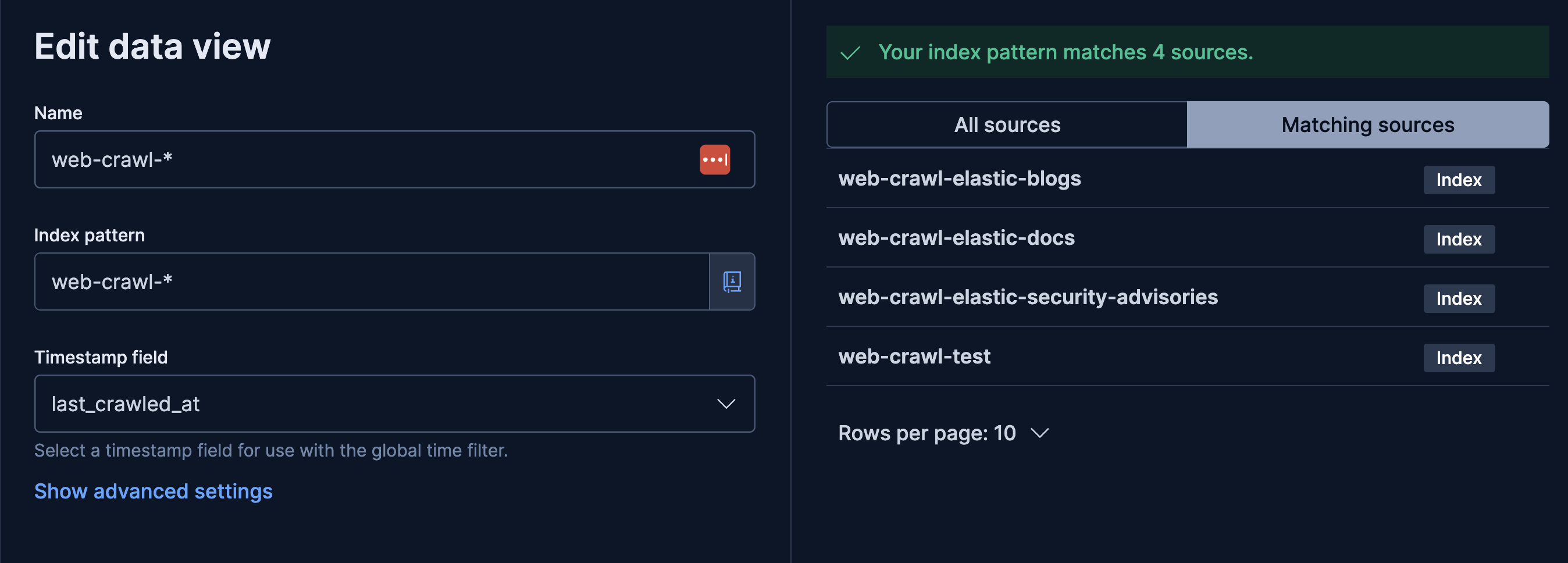
That’s it! You should now see the crawled data from Elastic’s documentation site in your Elasticsearch instance and be
able to explore it using Kibana.
Other Useful Elastic Documentation
Since we created a data view using the web-crawl-* index pattern, you can use this data view to explore other similar
named indices. Here are some other useful Elastic documentation indices you can crawl:
Crawl Elastic’s blog site at https://www.elastic.co/blog:
cat > crawl-config-elastic-blog.yml << EOF
output_sink: elasticsearch
output_index: web-crawl-elastic-blog

elasticsearch:
  host: https://<YOUR ENDPOINT>
  port: 443
  api_key: <YOUR API KEY>
  pipeline_enabled: false

domains:
  - url: https://www.elastic.co
    seed_urls:
        - https://www.elastic.co/blog
    extraction_rulesets:
      - url_filters: []
        rules:
          - action: "extract"
            field_name: "blog_post_content"
            selector: "article.single-post__content"
            join_as: "string"
            source: "html"
    crawl_rules:
      - policy: allow
        type: begins
        pattern: /blog
      - policy: deny
        type: regex
        pattern: .*
EOF
Crawl Elastic’s security advisories at https://discuss.elastic.co/c/announcements/security-announcements/31:
cat > crawl-config-elastic-security-advisories.yml << EOF
output_sink: elasticsearch
output_index: web-crawl-elastic-security-advisories

elasticsearch:
  host: https://<YOUR ENDPOINT>
  port: 443
  api_key: <YOUR API KEY>
  pipeline_enabled: false

domains:
  - url: https://discuss.elastic.co
    seed_urls:
      - https://discuss.elastic.co/c/announcements/security-announcements/31

    extraction_rulesets:
      - url_filters: []
        rules:
          - action: "extract"
            field_name: "content"
            selector: "#main-outlet .cooked"
            join_as: "string"
            source: "html"

    crawl_rules:
      - policy: allow
        type: contains
        pattern: security-update-esa
      - policy: deny
        type: regex
        pattern: .*%
EOF
Crawl Elastic’s security labs at https://www.elastic.co/security-labs:
cat > crawl-config-elastic-security-labs.yml << EOF
output_sink: elasticsearch
output_index: web-crawl-elastic-security-labs

elasticsearch:
  host: https://<YOUR ENDPOINT>
  port: 443
  api_key: <YOUR API KEY>
  pipeline_enabled: false

domains:
  - url: https://www.elastic.co # Use 'www' for canonical domain consistency
    seed_urls:
        - https://www.elastic.co/security-labs

    extraction_rulesets:
      - url_filters: [] # Apply these extraction rules to ALL pages visited
        rules:
          - action: "extract"
            field_name: "security_labs_content"
            selector: "div.article-content"
            join_as: "string"
            source: "html"

    crawl_rules:
      - policy: allow
        type: begins
        pattern: /security-labs
      - policy: deny # DENY: Everything else on elastic.co
        type: regex
        pattern: .*
 EOF